
-
Voice Caddie SC4 Pro – Portable Golf Launch Monitor and 3D Simulator
Regular price €499,00 EURRegular price€669,00 EURSale price €499,00 EURSale -
Voice Caddie SC300i – Portable Golf Launch Monitor
Regular price €299,00 EURRegular price€449,00 EURSale price €299,00 EURSale -
Voice Caddie SC200+ – Portable Golf Launch Monitor with Swing Speed Mode
Regular price €199,00 EURRegular price€229,00 EURSale price €199,00 EURSale

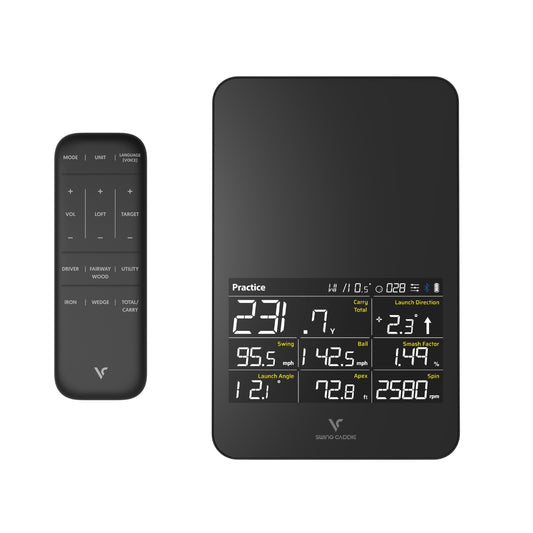


Key metrics to improve your game
Carry distance
Distance covered before landing, for more consistency.
Swing speed
Clubhead speed at impact to gain more distance.
Launch angle
Optimize trajectory for higher and longer shots.
Spin axis
Master draw, fade or straight shots to control every strike.
Designed for golfers of all levels, these monitors are portable, easy to set up and require no special balls. Real-time feedback optimizes every training session.
Which launch monitor is right for you?
Frequently asked questions — Swing Caddie Launch Monitors
What is the difference between the SC4 Pro, SC300i and SC200+?
The SC200+ focuses on the 5 essential data points (carry, total distance, swing speed, ball speed and smash factor) to build solid fundamentals. The SC300i adds key ball flight data such as spin rate, apex and launch angle to track progress in more detail. The SC4 Pro provides advanced analysis with 13 parameters, including spin and trajectory data, plus 3D simulation via E6 Connect with 5 included courses and analysis through the VoiceCaddie S app. All three work indoors and outdoors, with no special balls required.Which Voice Caddie launch monitor should you choose based on your level?
- The SC200+ is ideal for beginners who want to improve their fundamentals.
- The SC300i is perfect for regular players who want to track progress over time.
- The SC4 Pro is designed for passionate golfers who want full analysis, indoor simulation and professional-level data — with no mandatory subscription.
What parameters does a Voice Caddie launch monitor measure?
- SC4 Pro (13 parameters): carry, total distance, ball speed, swing speed, smash factor, launch angle, apex, spin rate, spin axis, backspin, sidespin, dispersion and direction.
- SC300i (8 parameters): the SC200+ 5 metrics plus spin rate, apex and launch angle.
- SC200+ (5 parameters): carry, total distance, swing speed, ball speed and smash factor.
Does a launch monitor really help you improve?
Yes. A launch monitor turns every session into structured practice: you can precisely measure how each adjustment affects your carry, ball speed or dispersion. Immediate, data-driven feedback helps you build better habits faster.Most SC4 Pro users report measurable improvement within 4 to 6 weeks of regular use.How do you use a launch monitor to increase distance?
- First measure your smash factor: below 1.45, focus on strike quality before adding speed.
- Check your launch angle — between 12° and 15° with a driver for most players.
- Adjust your tee height accordingly.
- Track your progress session after session using the VoiceCaddie S app.
Is a launch monitor useful for amateur golfers?
This is where it is most useful. An amateur needs objective data to improve without spending hours with an instructor. The SC4 Pro and SC300i can be used independently, with no technical skills: set up the device, connect the app, and get real-time feedback.Does a Voice Caddie launch monitor require special balls?
No. Voice Caddie models work with any standard golf ball, with no markings or proprietary balls required — unlike some competitors.SC4 Pro vs Garmin Approach R10: which should you choose?
At the same price point (€599), the SC4 Pro includes a 3D simulator with 5 E6 Connect courses with no subscription, whereas the Garmin R10 requires a paid subscription for simulation access. The SC4 Pro also measures spin axis and backspin at no extra cost.For indoor simulation with no recurring fees, the SC4 Pro offers better overall value.SC4 Pro vs Trackman: what is the difference?
Trackman is a benchmark system used at professional and elite levels. The SC4 Pro offers a much more accessible solution while still providing a wide range of relevant performance data for training and improvement. For amateur and advanced users, it delivers excellent day-to-day performance tracking. It is an accessible Trackman alternative for training and simulation at home.SC4 Pro vs Rapsodo MLM2Pro: which should you choose?
The MLM2Pro requires special Callaway RPT balls to measure spin, and its Premium subscription (around €230/year) is mandatory. The SC4 Pro has no mandatory subscription, includes 5 E6 Connect courses out of the box, and works with any golf ball.